
4.1 KiB
layout, title, categories, tags
| layout | title | categories | tags | |||
|---|---|---|---|---|---|---|
| post | Interface Orientations |
|
|
一.UISupportedInterfaceOrientations
这个UIKit的设定可以通过XCode工具来设定.
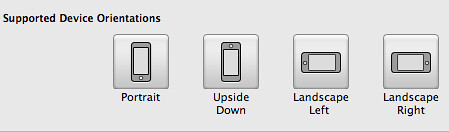
或者直接编辑info plist

对应的是一个数组,可以有以下几种类型
UIInterfaceOrientationPortrait
UIInterfaceOrientationPortraitUpsideDown
UIInterfaceOrientationLandscapeLeft
UIInterfaceOrientationLandscapeRight
那UISupportedInterfaceOrientations的作用是什么呢?
系统会根据UISupportedInterfaceOrientations支持的取向结合设备的当前取向来决定程序启动时的初始取向.
二.UIViewController's Interface Orientation
当设备的取向发生变化的时候,系统会发送UIDeviceOrientationDidChangeNotification通知,一般情况下我们自己不必亲自处理此通知,因为UIKit框架已经获取通知并做处理了。 有一点需要注意的是,不管什么取向,UIWindow的frame始终是不会变化的,可以认为其始终是Portrait的取向。还有就是当app启动的时候,UIViewController 都会从Portrait取向转到当前的取向。
1.声明UIViewController所支持的取向
{% highlight objc%}
-
(BOOL)shouldAutorotateToInterfaceOrientation:(UIInterfaceOrientation)orientation { if ((orientation == UIInterfaceOrientationPortrait) || (orientation == UIInterfaceOrientationLandscapeLeft)) return YES;
return NO; } {% endhighlight %}
返回YES,则说明当前UIViewController支持此orientation,返回NO则不支持此orientation
2.One-part Rotation
UIViewController 有几个方法可以让子类来覆盖 {% highlight objc%}
- (void)willRotateToInterfaceOrientation:(UIInterfaceOrientation)toInterfaceOrientation duration:(NSTimeInterval)duration; {% endhighlight %}
这个方法在旋转开始之前被调用. {% highlight objc%}
- (void)willAnimateRotationToInterfaceOrientation:(UIInterfaceOrientation)interfaceOrientation duration:(NSTimeInterval)duration; {% endhighlight %}
此方法是在旋转的动画的block中被调用的,也就是说,如果你需要在旋转的过程中添加额外的动画,则将代码添加于此处(当然得是animatable的属性的设置代码)。当此方法被调用的时候,UIViewController的view的bounds已是旋转之后的值了。当然还有一种方式是将旋转分成两步,只是这两个方法已是__OSX_AVAILABLE_BUT_DEPRECATED了,故不常用它便是,且其比一步的复杂些。
{% highlight objc%}
- (void)didRotateFromInterfaceOrientation:(UIInterfaceOrientation)fromInterfaceOrientation; {% endhighlight %}
当旋转结束后,此方法会被调用。
三.UIViewController旋转的本质
为了探究在UIViewController旋转的过程中到底发生了什么,可以新建一个Single View的项目用来测试。
ViewController设置为UIWindow的rootViewController.当旋转的时候rootViewController旋转相关的方法会被调用,且rootViewController的view会发生旋转。
假设程序启动时,app的取向是Portrait,即如下图所示
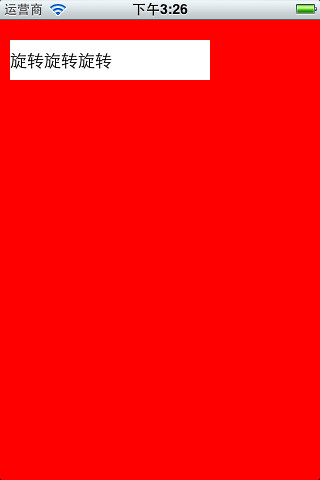
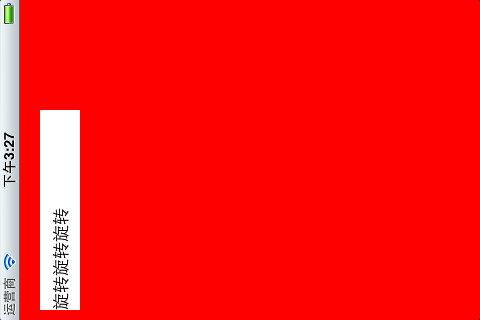
当旋转,运行到willAnimateRotationToInterfaceOrientation之时,其view的bounds已是新的,只是其frame此时为(0 0; 300 480),不过view本身的transform为旋转90度的变换(transform = [0, 1, -1, 0, 0, 0]),且view有animates相附,
{% highlight objc%}
animations = { transform=<CABasicAnimation: 0x6a79840>; position=<CABasicAnimation:
0x6a91fa0>; bounds=<CABasicAnimation: 0x6a920e0>; };
{% endhighlight %}
可知其位置和bounds都有相关动画。
旋转结束之后为如下样子
view的frame是(0 0; 300 480),只是进行了transform,且依据AutoresingMask进行了调整
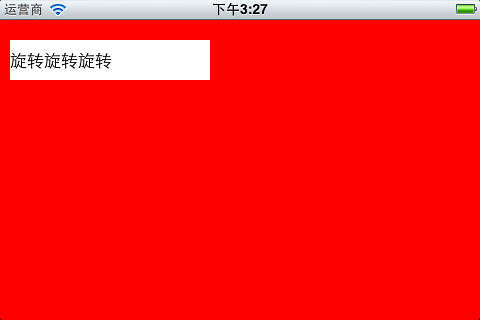
只有知道旋转的本质之后,很多事情理解起来就深刻多了。